MobiRest POS products

MobiRest is a POS platform designed for HORECA businesses, including restaurants, bars, pubs, hotels, and more. It offers a variety of solutions to meet the needs of business owners, employees, and customers.

MobiRest Business website #
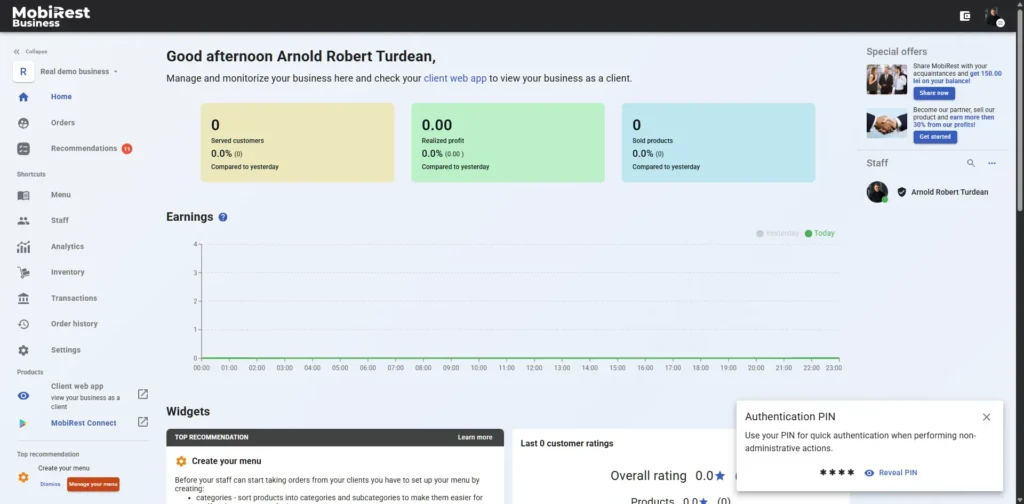
The https://mobirest.business website serves as the core platform of the MobiRest system. Administrators can manage all aspects of their business, including menu creation, staff management, subscription settings, and access to detailed statistical reports.

Employees use the platform to handle their daily operations — such as taking and serving orders, monitoring incoming requests in the kitchen or bar, printing bills and receipts, and more.

The website is designed for easy use on both computers and mobile devices, allowing you to access your business anytime, anywhere with ease.

We strongly recommend accessing the system by using Google Chrome browser. By using Chrome you can also install the system as an application in Android, Windows and IOS as well. Check the “Install MobiRest” option in the Chrome browser’s menu or at the right side of the address bar. Once the app is installed as an application it will behave like a native app on the device, you will find it near your other apps.

MobiRest Connect app #
The MobiRest Connect app is and Android app which runs on both Android mobiles and tablets. The app’s goal is to connect your devices like, cash registers, thermal and fiscal pritners to the system. The app must run in at least one Android device locally in your business in order to print bills, receipts, preparation & pickup tickets, etc.

You can download the application from the Play Store.

MobiRest client web app #

The application was designed for your customers. By using the app, they can:

  • browse your digital menu
  • call the waiter
  • ask for the bill, by also mentioning the payment type (cash or card)
  • order without having to call the waiter
  • receive notifications when their courses has been prepared

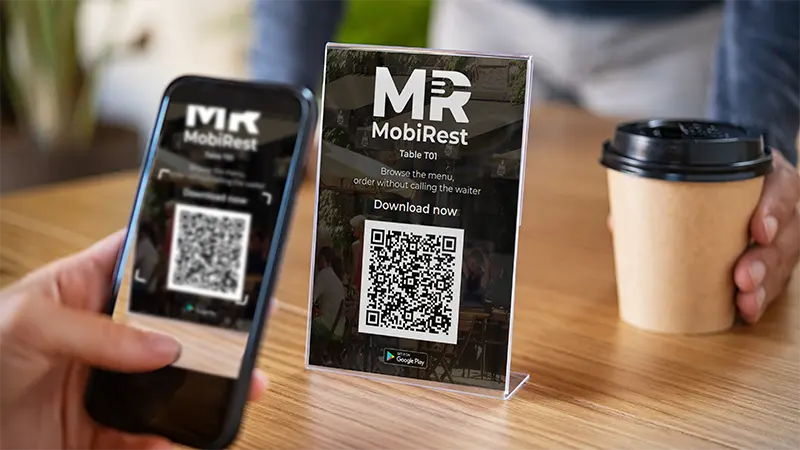
Megjegyzés: Vendégeid az alkalmazást a asztalkártyákon található QR-kód beolvasásával tudják használni.
MobiRest TV order status app #

This app is designed to display the status of customer orders on a television screen. It also features an audio notification system that reads new and prepared orders aloud, ensuring customers are instantly informed both visually and audibly — all without requiring any additional effort from your staff.

You can download the application from the Play Store.

Updated on 1 November 2025
Was it helpful?

Frequently Asked Questions

General Questions

  • What is MobiRest?

    MobiRest is a cloud-based point of sale (POS) system designed specifically for HORECA businesses, including restaurants, pubs, and other dining establishments. It provides a user-friendly interface that allows businesses to manage their operations, including sales tracking, inventory management, staff scheduling, and customer relationship management. MobiRest offers a range of features tailored to the needs of the hospitality industry, making it a valuable tool for improving efficiency and enhancing customer experience.

  • How is MobiRest different from other POS systems?

    MobiRest is specifically designed to engage your customers, offering a modern, tech-driven experience they’ll love. It’s AI-powered, providing smart tools like price suggestions and real-time translations that streamline operations. MobiRest is cloud-based, requiring no expensive hardware, and has no initial setup fees, making it both affordable and easy to adopt. With an intuitive interface that’s simple to use, MobiRest helps you create a seamless, digital-first environment that resonates with today’s tech-savvy customers while boosting your restaurant’s efficiency. 

  • Does MobiRest offer a free trial?

    NO! Why wait for a free trial when you can dive in immediately? With Demo Businesses, you can explore MobiRest in seconds — no setup required.

    Each demo business comes fully preconfigured with a complex menu and showcases all the system’s powerful features. Test, explore, and experience the full potential of MobiRest without spending time on setup — see how effortless managing a modern restaurant can be! 

Features

  • Does MobiRest have AI features?

    Absolutely! MobiRest includes AI-based tools like product price suggestion based on AI powered market research, product description generation, and real-time translation for your menu to different languages. 

  • How can customers benefit from the MobiRest system?

    By using the MobiRest POS system, you can attract the attention of tech-savvy customers by enabling them to interact with your restaurant directly from their smartphones. With MobiRest, customers can effortlessly browse your digital menu, request a waiter, ask for the bill while specifying their preferred payment method, and even place orders—all without needing to call a waiter to their table. This seamless, modern experience enhances convenience and engagement, creating a dining experience that resonates with today’s digital generation. 

  • Can I manage stock with MobiRest?

    Yes, MobiRest provides powerful inventory management tools that enable you to easily monitor stock levels and set automatic alerts when supplies run low.

Technical and Support

  • How easy is it to set up MobiRest?

    Setting up MobiRest is simple and user-friendly. Anyone can configure the system to fit their unique business needs with ease. We provide extensive, free documentation to help you maximize the system’s potential. Additionally, our premium customers receive online setup assistance for a seamless onboarding experience. 

  • What are the system requirements for MobiRest?

    MobiRest is a cloud-based system, allowing administrators and employees to access the system via any modern web browser on devices like tablets, smartphones, and computers.

  • Can MobiRest use my existing cash register or thermal printer?

    Yes, MobiRest is compatible with a variety of cash registers and thermal printers. You can find a full list of supported devices on our hardware page. If you have a different device not listed, feel free to contact us—we’re more than happy to assist with compatibility solutions.

Didn't find the answer to your question? No worries, feel free to reach out to us!

Try MobiRest in less than 5 minutes​

Step 1

Sign Up
Create your account by providing your email address and choosing your password.
Try it for free
Step 2

Create your live or preconfigured demo business
Create your pub/restaurant/fast food/hotel or any other type of hospitality business based on your needs.
Try it for free
Step 3

Install the POS application​
Install the MobiRest Business application on your tablet(s), and let your employees use it for their daily work.
Try it for free
mobirest

Book a demo

Fill out the form below, and we will contact you to arrange a free demo!

9 Steps for a Successful Restaurant / Pub

Get your customers’ attention by implementing the steps included in our e-mail series “9 Steps for a Successful Restaurant / Pub”

The Website uses cookies and similar technologies necessary to provide You with the best quality Services. By continuing to use the Website You accept the use of cookies. For more information check out our Cookie Policy.

Cookies are small text files that can be used by websites to make a user’s experience more efficient.
The law states that we can store cookies on your device if they are strictly necessary for the operation of this site. For all other types of cookies we need your permission.