To provide required legal documents like invoices, bills and receipts, you must configure your business’s legal settings. Go to “Settings/General” → “Legal” to set them up. (https://admin.mobirest.business/settings/legal-settings)
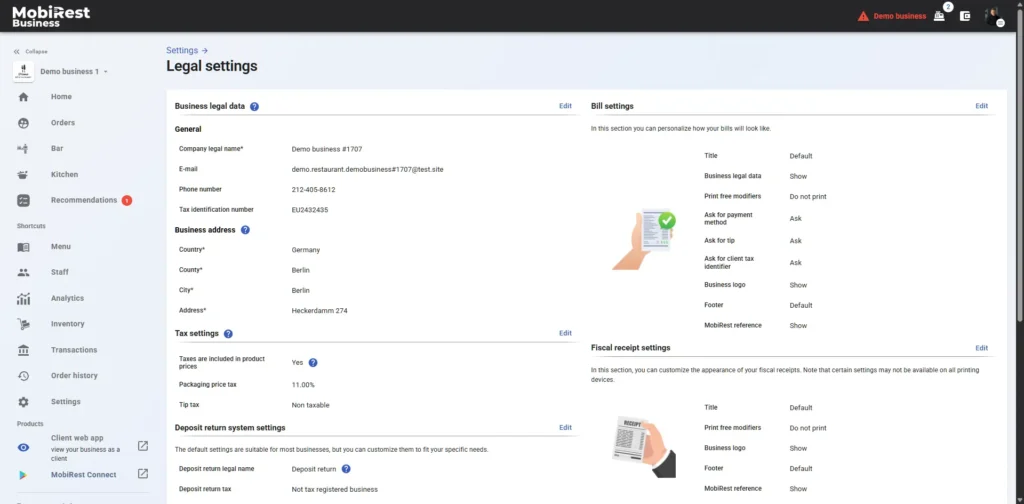
Business legal data #
In this section, you can set up essential legal details for your business, including its legal name, tax identification number, and legal contact information. These details will appear on legal documents such as invoices, receipts, and proforms. You are solely responsible for ensuring the accuracy of this information.

Tax settings #
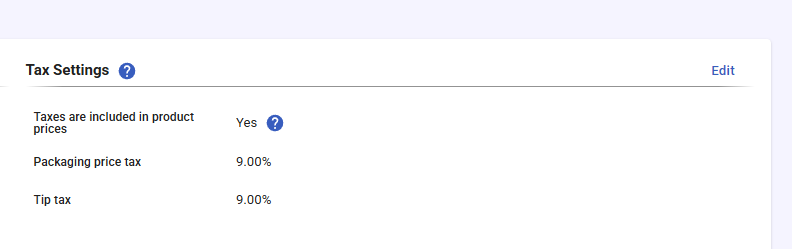
Here, you can define key tax-related settings, such as:
- Whether taxes are included in product prices (e.g., included in Europe but not in the U.S.).
- Packaging tax based on your country’s regulations, which will apply to the packaging cost of all products that can be ordered packed.
- Tip taxes, which will be applied to all tips paid by customers.
Price-related tax settings can be configured separately for each product and modifier, as they may vary depending on the ingredients and country regulations.
Taxes on your invoices, receipts, and bills will be automatically calculated based on these settings.
Deposit return system settings #
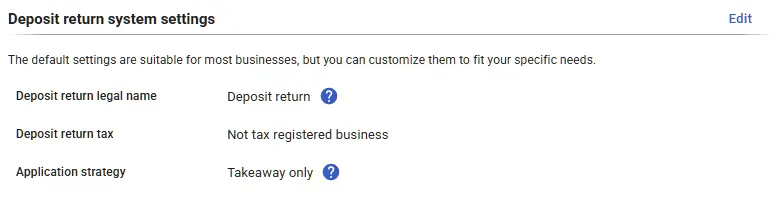
Here you can configure the legal settings of the deposit return system. The default settings are suitable for most businesses, but you can customize them to fit your specific needs.
Deposit return legal name: The deposit return will appear under this name on your legal documents, such as bills and receipts.
Deposit return tax: By default, deposit return values are typically not subject to tax. However, you can configure tax settings here if your country requires it.
Application strategy: The always option applies deposit returns to all items, while the takeaway only option applies them exclusively to the items sold for takeaway.
Bill & Fiscal receipt settings #

In this sections you can personalize how your bills and receipts will look like. Note that certain settings may not be available on all printing devices.